 continuo
Migrating two dbt projects from Airflow to continuo
Data pipelines get deployed without a release process. A dbt change ships the minute it merges, and Airflow will run it on the next schedule whether or not it breaks the team reading your tables downstream. Nothing checks first. Software solved this with staging and validation gates. Data mostly didn’t. 🚢
This is a full migration. Two real dbt projects that run on separate Airflow schedules, moved onto continuo, a control plane that treats a data change like a release: validate the whole graph first, promote only if it’s safe. By the end, the same breaking change that Airflow ships without a warning is a release continuo refuses.
Everything runs on your machine. Three repos: two for the Airflow “before”, one for the continuo “after”.
The before: two teams, two schedulers, zero shared knowledge
The core team owns transactions and revenue. The finance team builds unit economics (lifetime value, cost per user) on top of core’s tables. Two teams, two repos, two Airflow instances.
core runs at 02:00. finance runs at 03:00, because core is usually done by then. That word, usually, is the whole problem. finance’s Airflow has no link to core’s. It fires at 03:00 whether core finished, failed, or quietly renamed a column finance depends on.
On a good night, both run green:
| Team | Reads / builds | Status |
|---|---|---|
| core · 02:00 | builds analytics.revenue_per_user |
✅ promoted |
| finance · 03:00 | reads revenue_per_user → builds ltv_per_user |
✅ promoted |
Clone the two teams and see for yourself:
# the core team's Airflow (also starts the shared warehouse)
git clone https://github.com/carolsimone/airflow-core-demo
cd airflow-core-demo && make up

# the finance team's Airflow, separate stack, same warehouse
cd ..
git clone https://github.com/carolsimone/airflow-finance-demo
cd airflow-finance-demo && make up
Give each scheduler a minute to parse its DAG, then open both Airflow UIs:
| Team | Airflow UI | Username / password |
|---|---|---|
| core | localhost:8080 | admin / admin |
| finance | 127.0.0.1:8081 | admin / admin |
Why 127.0.0.1 for finance: browsers share cookies across ports, so two Airflows on localhost keep logging each other out. A different host name gives each UI its own session.
Each scheduler runs its DAG once as soon as it has parsed it, so both UIs show a green run within a couple of minutes.
The break: core changes one column, finance breaks, nobody knows
core renames a column: revenue_eur becomes net_revenue_eur. A reasonable change: the number is net of fees now, and the name should say so. core updates its model, its tests, its docs. core’s pipeline runs green. Every check core owns passes.
An hour later, finance fires. Its ltv_per_user model still does SELECT revenue_eur, and that column is gone. 💥
cd ../airflow-core-demo
make break   # core renames the column
make run     # core's run: success, every core test passes

cd ../airflow-finance-demo
make run     # finance's run: ERROR: column "revenue_eur" does not exist
make run triggers the team’s DAG now instead of waiting for its 02:00 or 03:00 slot.
| Team | What happened | Status |
|---|---|---|
| core · 02:00 | renamed revenue_eur → net_revenue_eur |
✅ promoted |
| finance · 03:00 | column "revenue_eur" does not exist |
❌ failed |

No alert fired. No release was blocked, because there was no release, just two cron jobs that met in a shared schema and hoped. The wrong number lands in a dashboard, and someone finds it the next morning. Two separate schedulers cannot see across a team boundary. That’s not an Airflow bug. It’s the missing layer. Let’s add it.
Step 1: Install continuo
You need a continuo platform to migrate onto, and the same helm install brings it up on a laptop or in production. For this walkthrough, run it on a local cluster: one command installs continuo and its bundled datastores. Follow Instantiate the continuo platform (about ten minutes), then come back here.
The local install is the quickstart, not a toy — the release flow below is identical in production. There you deploy the same chart to your own cluster, backed by your own Postgres, Redis, Neo4j and object store; the deploy guide covers that bring-your-own-datastores path. Nothing in this migration is local-only.
Remember to port-forward your cluster’s ui service to localhost if you are building locally and want to have the ui available to you:
kubectl -n continuo port-forward svc/ui 8090:8090 &
kubectl -n continuo port-forward svc/continuo-dex 5556:5556 &
grep -q "continuo-dex" /etc/hosts || echo "127.0.0.1 continuo-dex" | sudo tee -a /etc/hosts

# Log in with admin@example.com / password.
open http://localhost:8090
Step 2: Move the projects onto continuo
The dbt code doesn’t change. The two projects move into one repo, continuo-core-finance-demo, and release through continuo instead of a cron. Per project it’s three steps:
- Take the dbt project as-is. No model edits. The cross-service reference stays a plain
FROM analytics.revenue_per_user. - Add a Dockerfile. The project already builds as an image.
- Replace the scheduler with a release. Instead of a cron trigger, you POST a release to continuo.
continuo’s release API is public: the ui serves it at /api/v1, behind the same login as the dashboard. With the ui and Dex port-forwards from Step 1 running, ask Dex for an operator’s ID token (the demo account’s password is password), then release both services:
CLIENT_SECRET=$(kubectl -n continuo get secret continuo-dex -o jsonpath='{.data.client-secret}' | base64 -d)
export CONTINUO_TOKEN=$(curl -s -u "continuo-ui:${CLIENT_SECRET}" http://localhost:5556/dex/token \
  -d grant_type=password -d scope="openid email profile" \
  -d username=admin@example.com -d password=password | jq -r .id_token)
export API=http://localhost:8090/api/v1

git clone https://github.com/carolsimone/continuo-core-finance-demo
cd continuo-core-finance-demo
make release SERVICE=continuo-core    TAG=v1
make release SERVICE=continuo-finance TAG=v1
If echo $CONTINUO_TOKEN prints null, the login failed: check that the Dex port-forward is running. The token is yours, as an operator, and lasts an hour; when a call answers 401, run the export CONTINUO_TOKEN=... command again. Each make release builds the image, loads it into the cluster and POSTs /api/v1/releases with the release_id, service and image_tag, plus the repo and commit_sha that say where the release came from (a person supplies them; a pipeline’s GitHub Actions token carries them itself). The first release, core’s, finds production unseeded and bootstraps: it promotes without validation. Every release after it, finance’s included, is validated against the whole graph before it promotes. You can read what production is running at any time:
curl -s -H "Authorization: Bearer $CONTINUO_TOKEN" $API/current-prod | jqEach ends promoted, and there’s the first win: there is no 03:00 for finance anymore. continuo reads that finance depends on core and orders the build itself, the ordering two separate crons could only approximate.
| Service | continuo | Status |
|---|---|---|
| continuo-core | first release: bootstraps an empty production | ✅ promoted |
| continuo-finance | reads core’s revenue_per_user; validated across the graph, then promoted |
✅ promoted |
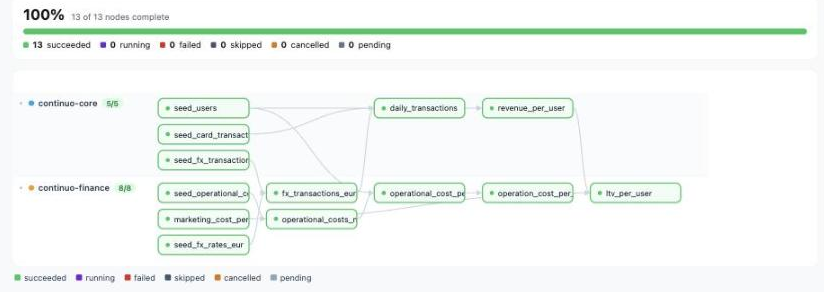
Then trigger a run of the daily schedule from the UI so the tables are built. (The platform guide covers logging in.) One run, both services, in one graph: core’s nodes and finance’s in their own lanes, with the cross-service edges continuo sequenced on.
Step 3: The same break, rejected before it ships
Now make the exact change that broke finance on Airflow: rename revenue_per_user’s output column revenue_eur to net_revenue_eur in services/continuo-core (the repo’s README has the three sed lines that make the change), and release core again:
make release SERVICE=continuo-core TAG=v2This time it is rejected. continuo validates core against the whole topology, sees that continuo-finance’s ltv_per_user still reads revenue_eur, and refuses to promote. Production never changes: current-prod still points at the last good release.
| Node | What continuo saw | Status |
|---|---|---|
| continuo-core | rename validated across the graph → finance would break | ❌ rejected |
| production | current-prod unchanged, the bad release never shipped |
✅ safe |
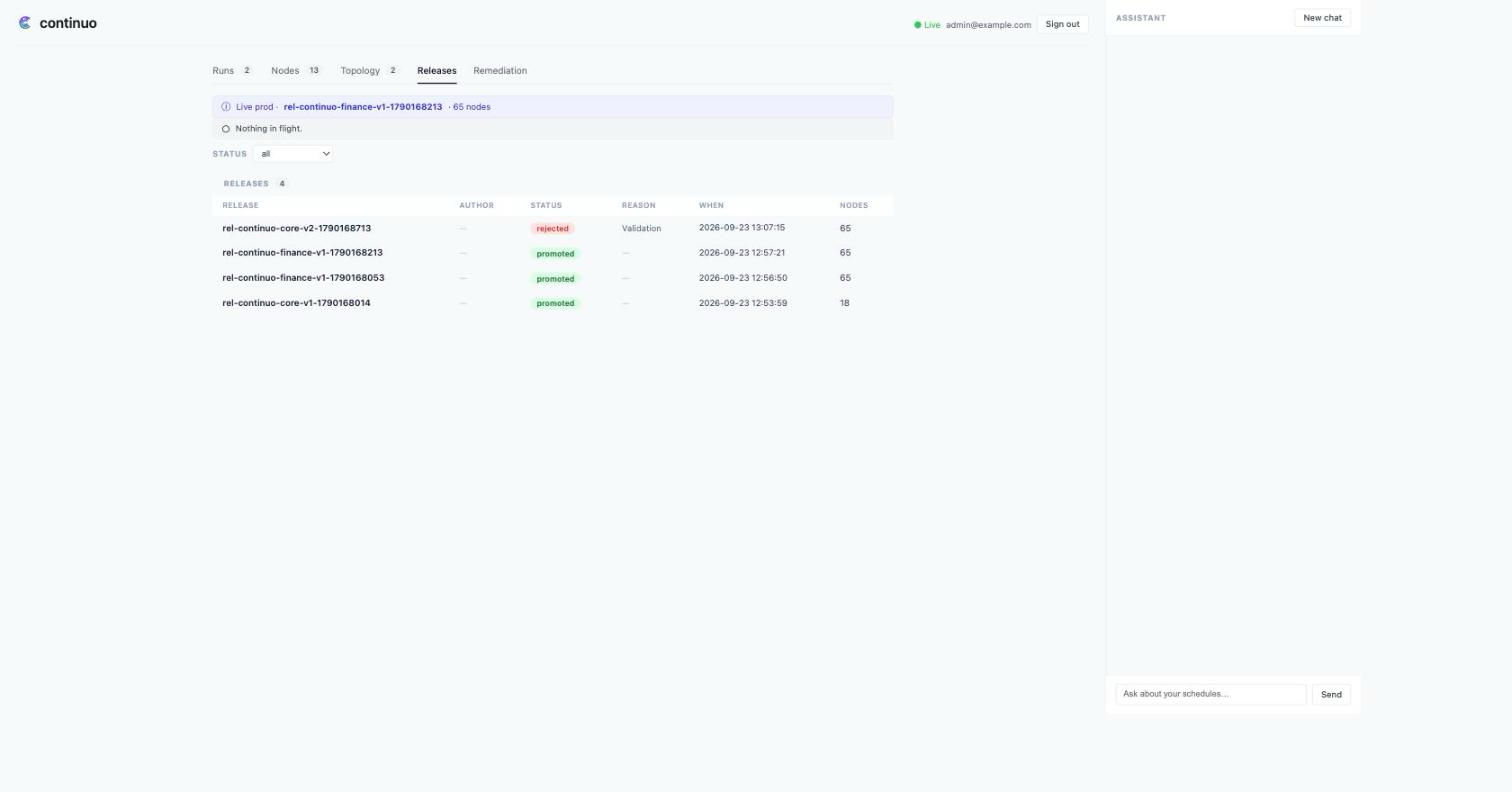
Airflow found the break at 03:00, in production, in finance’s data. continuo found it at release, in a shadow, before anything shipped.
Step 4: Agentic Remediation proposes the fix
A rejected release tells you something broke. continuo can also try to fix it. When the release is rejected, continuo’s Agentic Remediation classifies the failure, reads the changed model’s source from the release it compiled, and asks an LLM for a repair, then runs a real validation to prove the fix works before showing it to you. It never writes to your repo: the output is a diff you review and a pull request you choose to open. 🤖
For this break, it edited core’s revenue_per_user and kept both column names: the new net_revenue_eur and revenue_eur back as an alias, so finance’s ltv_per_user reads again without finance changing a line. Verified by a live dbt run, confidence high, one click from a PR:
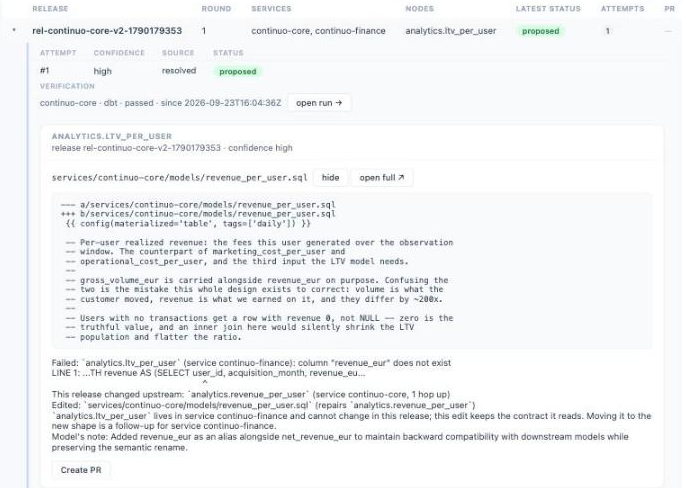
The fix lands in the service that changed, core, because the downstream model in finance can’t change in this release: its own fix could never ship ahead of the change that broke it. This step needs one credential the rest of the demo doesn’t: an LLM key to write the fix. The platform guide shows where it goes, plus the GitHub App that turns Create PR into a real pull request against your repository.
Why it’s better: dependencies, deployment, integration, and Agentic Remediation
Four things continuo gives that two Airflows can’t:
- Cross-service dependencies. core and finance depend on each other across projects (core reads a finance table; finance reads a core table). On Airflow that mesh had no run order two cron schedules could express, so you scheduled an hour apart and hoped. continuo orders it from the dependency graph itself, every release.
- Deployment. A change is validated against the whole topology before it promotes, blue/green. The rename wasn’t wrong: teams rename columns every week. What was missing was the gate every software deploy has and most data pipelines don’t: something that looks at the whole graph and says “not yet” before a change lands. 🔒
- Integration. Plugging a project in takes one endpoint. Your CI builds the image and pushes it to the registry you already use; then, at CD time, you POST the service name and image tag to the platform’s
/api/v1/releasesendpoint, authenticated with the pipeline’s GitHub Actions token: no kubeconfig and no stored secret. That’s the whole contract: no DAG to write, no scheduler to run or upgrade, no change to the dbt code. - Agentic Remediation. A rejected release isn’t a dead end. continuo’s agent reads the changed model, asks an LLM for a repair, and proves it with a real validation run before it shows you anything: the output is a diff you review and a one-click pull request, never a write to your repo. Airflow tells you what broke, after it broke. continuo proposes the fix before anything ships. 🤖
Run it yourself
Clone the two “before” repos, run make break, and watch finance fall over. Then install continuo and move the projects onto it, and watch the same change get stopped, then watch Agentic Remediation propose the verified fix as a pull request you can merge.
airflow-core-demo · airflow-finance-demo · continuo-core-finance-demo
kind create cluster --name continuo
helm install continuo oci://ghcr.io/carolsimone/charts/continuo \
  --version 0.18.0 -n continuo --create-namespace